
Find the bottleneck before adding storage
A small closet can feel full because the storage does not match the clothes, because the door hides part of it or because items are hard to reach. Empty one section, group what belongs there and identify the specific problem before changing the layout.
Make a storage inventory
Separate long-hanging clothes from shirts and folded items. Count the shoes you use regularly and measure the containers you want to keep. A closet full of coats needs a different arrangement from one mostly used for folded clothing and shoes.
- Keep daily items in the most accessible section.
- Reserve uninterrupted hanging height for long garments.
- Consider stacked hanging zones for shorter garments if the measured space permits them.
- Use containers for loose items that disappear in deep shelves.
Plan around the door
With sliding doors, one part of the closet remains covered when another part is open. Put drawers and frequently used items where you can reach them. With hinged doors, check the door swing and the path into the room. Keep the real openings on your sketch even if an AI preview changes them.
Compare open shelves with drawers
Open shelves make frequently used items visible, but deep stacks can hide what is behind them. Drawers separate smaller items, though they need opening clearance. Compare the look in a preview, then test the access with measurements.
Preview a reach-in closet in Closet Design
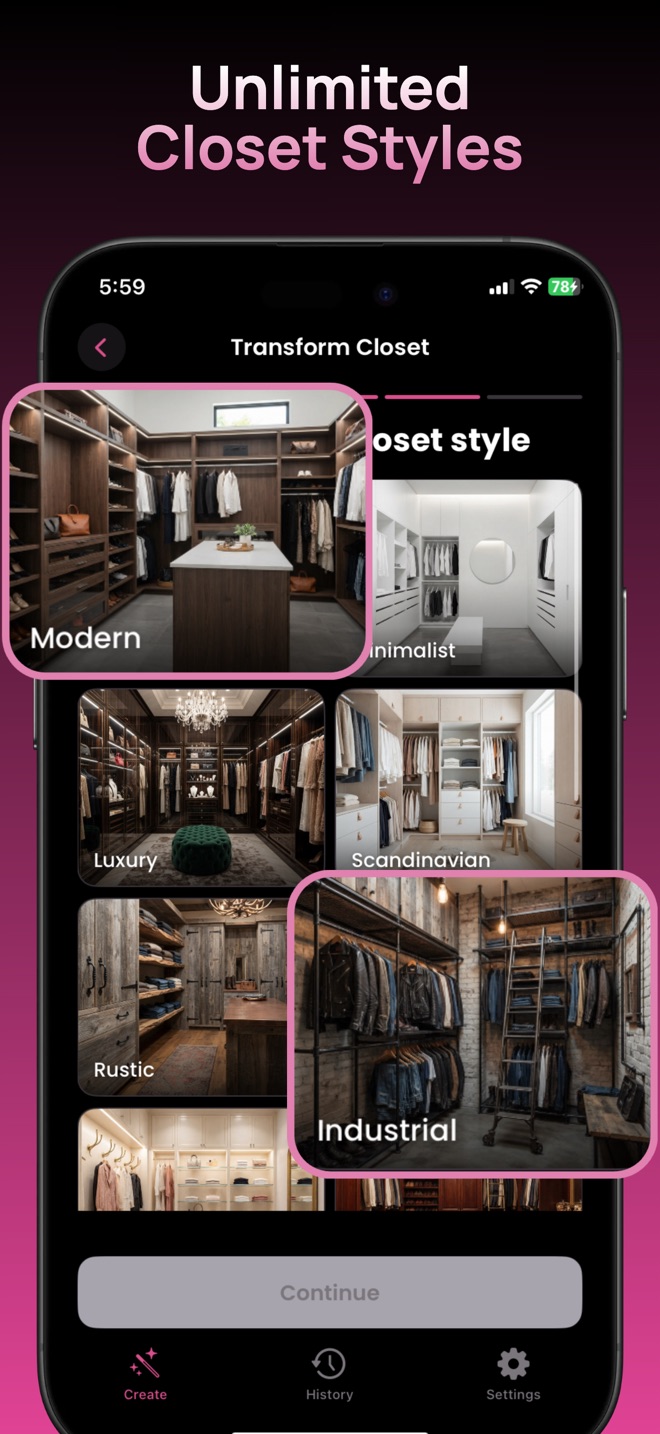
Take a straight, well-lit photo showing the entire closet opening. In Transform Closet, choose the Reach-In closet type and a style. Try Minimalist for a simple visual direction or Scandinavian for a lighter wood concept. Save the result and compare it with your source photo.
The style-picker screenshot below shows real app controls, using walk-in inspiration images. Your own input should be the small closet you want to change.
Keep the concept realistic
Look for previews that preserve access and avoid introducing an island or oversized cabinets into a narrow closet. AI does not validate shelf dimensions, drawer clearances or installation requirements. Confirm those separately before purchasing.
Next, compare shelving options or follow the photo makeover steps. For a separate dressing room, read our walk-in layout guide.
Try a specific closet project
Explore your own closet concept.
For iPhone and iPad. Free download with optional in-app purchases.
Get Closet Design on the App Store ↗