
Start with a photo of the space you actually have
A photo-based closet makeover is useful when inspiration pictures are hard to relate to your own room. Closet Design uses your image to generate a visual concept. Use the result to compare looks and explain your preferences before you commit to a renovation.
1. Photograph the room clearly
Stand far enough back to include the storage wall, floor and ceiling. Use even light and keep the camera level. A photo that includes doors and windows gives the image generator more room context. Avoid a close-up of a single shelf when you want to explore the entire closet.
Keep your original photo so you can check whether a generated concept has changed an opening, the apparent room size or an architectural detail.
2. Choose Transform Closet and a design style
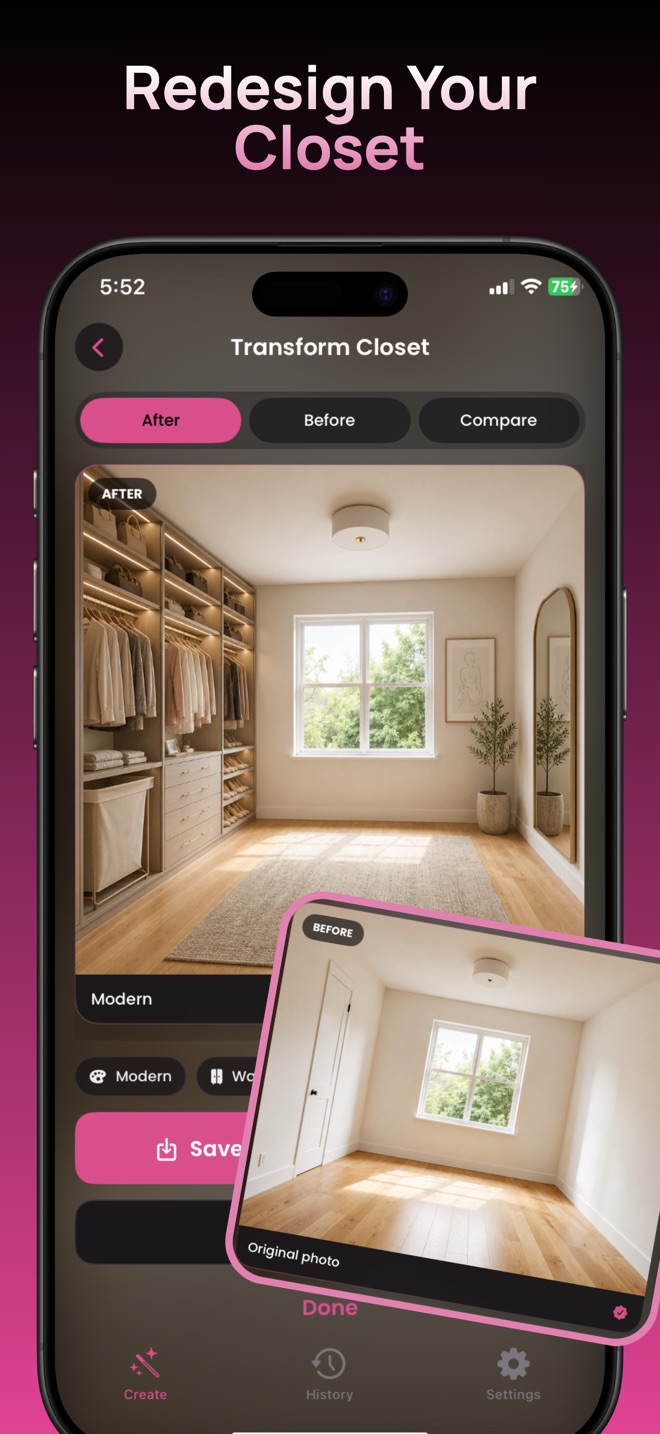
In the app, start with Transform Closet and select your room photo. Pick the closet type that fits your space, then choose a style. Modern, Minimalist, Luxury and Scandinavian are among the choices shown in the app's style picker.
For a useful first comparison, try two distinctly different looks on the same source photo: for example, Modern and Scandinavian. Compare cabinet finish, open shelving and the overall feeling of the room.
3. Compare the result with the original
The result screen includes After, Before and Compare controls. Look at the storage concept and also check what changed around the windows, door and floor. Save a concept you like as a reference for further planning.
What a generated makeover can and cannot tell you
The preview helps you choose a visual direction. It does not prove that cabinets fit, drawers clear the doorway or a shelf can carry a particular load. AI images may change proportions or add details. Measure the real room and confirm installation details with your supplier before buying.
What if I only want to change the shelves?
Try a focused shelving change instead of a complete makeover. Our closet shelving visualizer guide explains how to compare finishes and storage types.
Try a specific closet project
Explore your own closet concept.
For iPhone and iPad. Free download with optional in-app purchases.
Get Closet Design on the App Store ↗